Posts

SQL Performance: Say no to the "NOT IN" operator
Image
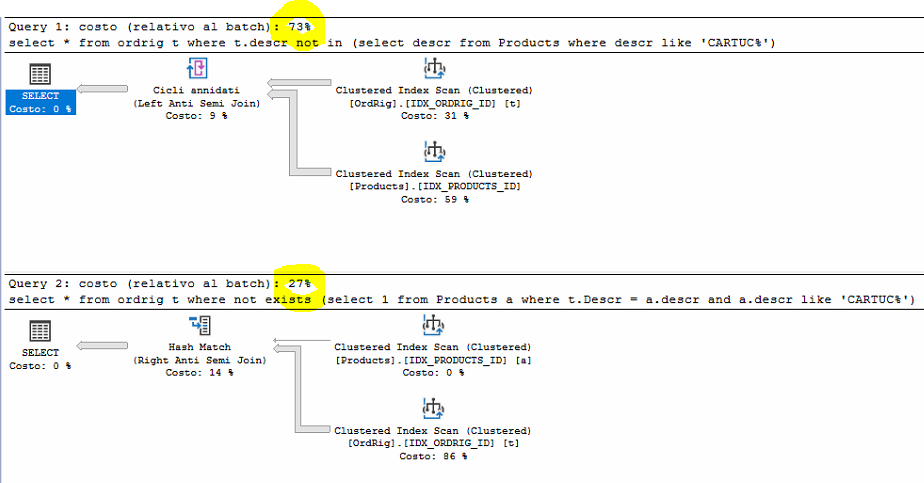
Hello friends, Paraphrasing the title of the american television show " Say Yes to the dress ", our title of today is " Say no to the NOT IN operator ". Why?  Well, we will show you that the " Not in " operator can be substituited with the " Not Exists " operator and that normally the Not Exists operator is fastest ! How we write a Query ultimately determines how much it will be efficient. Yes, SQL Server is a declarative language ( we tell him what we want to achieve and he internally decides how to get it ) but if we help him by applying a series of good rules we will get improvements from the point of view of performance. But now, as usual, we will show you with an example Let's go! For the example we will use our tables ORDRIG and PRODUCTS. Each table have a clustered index on the ID integer field: CREATE CLUSTERED INDEX IDX_ORDRIG_ID ON ORDRIG(ID) CREATE CLUSTERED INDEX IDX_PRODUCTS_ID ON PRODUCTS(ID) Well...

SQL Server, A bit of reverse engineering inside the parser: the Parser and the GetChar procedure. (attention contains news published for the first time)

Image
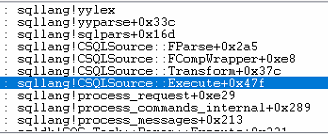
Hello friends, Welcome to another post about the Parser. We started talking about it in this posts: SQL Server is a compiler! & Where T-SQL tokens are stored? What did we say? Briefly we say that every batch you send to the engine is forst analized and then traduced into a series of more simple instructions called the input tree . Each command is parsed by a parser routine coded into the CParser class that is located in the SqlLang.dll .   SO the job of the Parser is to retrieve characters from the input string, break then into token and finally add the operation to be executed into the Tree structure input tree . I know you are curious to enter in greater details! Well you are right this is a first! The CParser::GetChar procedure What is the GetChar procedure? The Getchar procedure is a routine part of the CParser class that read every character you send to the sql server engine. From the picture below we can take a look to the call stack of the SQLLang.dll. The Getchar p...

SQL Server: Insert rows in a table and at the same time retrieve the id inserted with only a single statement? the OUTPUT and the OUTPUT INTO clauses

Image
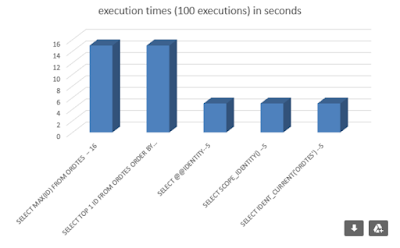
Hello friends! Two or three months ago we talk about How to get the Last Inserted Identity value You know that our goal is to find always the fastest method. According to that post we found that the fastest ways is to use the @@IDENTITY, SCOPE_IDENTITY or IDENT_CURRENT(T) commands: So a good way to insert rows in a table and retrieve the last identity is this: Oh yes! Cool! but we need again 2 T-SQL commands! How to improve? The OUTPUT and the OUTPUT INTO clauses "It's easy and plan" For the example create a table named Product and a clustered index: Create table Product (id int identity(1,1), codice varchar(20)) Create clustered index pk_Product on Product(id) Then execute the following statements: Insert into Product (codice) OUTPUT inserted.id Values ('A')  You will immediately noticed that the T-SQL command return the id inserted: The simply tips is the OUTPUT clause . Very helpfuf is also the OUTPUT INTO clause: Declare @val table (id int) Insert into Prod...

Sql Server: The execution plan and the cost of the operators inside it. The clustered index scan operator. Part 1.

Image
Hi friends! Welcome back, today we will not continue to talk about the parser part of SQL Server as in the previous post, we will do it in the next post! Today we start a short new series of posts that talks about the Execution plan and how to calculate the cost of the operators inside it. Are you ready? Three, two, one ...go!   A bit of theory One of the less explored part of SQL Server is the logic contained inside the optimizer. We already talked about the optimizer in greater detail here It's goal is to find a good execution plan in order to resolve our Query. For example, is the optimizer that chooses which type of JOIN to use to resolve the T-SQL command. So you can follow me step by step, i have prepared this example for you Create table table1 (id int identity (1,1), codice varchar(40), descr varchar(80)) Create table table2 (id int identity (1,1), codice varchar(40), descr varchar(80)) Create table table3 (id int identity (1,1), codice varchar(40), de...

SQL Server is a compiler! & Where T-SQL tokens are stored?

Image
Hello friends, First of all i want to wish you an happy new yea r! I know 2020 hitted hard for many of us and hitted hard also for me too! But it is necessary to be positive, go on and working hard. In this manner who can stop us? nobody can! For the first post of this 2021 i would talk about the SQL Server parser exploring how it works . We have already talked about this topic in the beginning of the 2020 with with a series of posts: Inside the SQL Server Query Optimizer - part 1 Introduction and the input tree Inside the SQL Server Query Optimizer - part 2 All about the Simplification   Inside the SQL Server Query Optimizer - part 3 Cardinality estimation etc But now it is the time  to go into a deep detail! Are you ready? go! SQL Server is a compiler! Yes, SQL Server is a compiler. The input of the compiler is the T-SQL command you send to the engine. Every batch you send is analized and traduced into a series of more simple instructions. The heart of the compiler is a pars...

SQL Server, How to find a text inside a SQL Server trigger or procedures?

Image
Hello Friend, Today we have a little but useful post. I know many of you already know how to search for text inside a trigger or inside a stored procedure. But for those who still don't know. How to find a text inside a SQL Server trigger or procedures?   This is the simple T-SQL string: SELECT DISTINCT O. NAME AS OBJECT_NAME,O. TYPE_DESC FROM SYS.SQL_MODULES M JOIN SYS.OBJECTS O ON M. OBJECT_ID =O. OBJECT_ID WHERE M. DEFINITION LIKE '%<TEXT_TO_SEARCH_FOR> %'     A simple example..   Define a trigger:   CREATE TRIGGER TR_ORDRIG_UPD ON ORDRIG AFTER INSERT AS BEGIN   UPDATE T     SET T . TOTQTA1 = TOT . TOTQTA1   FROM dbo . ORDTES T     JOIN INSERTED I ON I . IDORDTES = T . ID        CROSS APPLY ( SELECT SUM ( R . QTA1 ) AS TOTQTA1 FROM dbo . ORDRIG R WHERE R . IDORDTES = T . ID ) AS TOT END   And now exec...

SSMS 18.7.1 installation and news!

Image
Hello friends! November hitted hard for me and sometime you just need a little rest! But now i am here again so... Today we will talk about the SSMS aka SQL Server Management Studio . What is, How to install it and what features it introduces. Are you ready? go! SSMS 18.7.1 installation First step, go on the microsoft page and download the last SSMS:     Once downloaded the executable, execute it.   The installation process is eally easy so "Just Press the Install Button": Et voilà, the installation come to an end! Now you can use the last version of the SQL Server Management Studio. Ok but what is really the SSMS? Important:  The SSMS is nothing else than the graphics interface used to interact with the database engine. T-SQL commands are understood by the database engine and not by the SSMS.  By default when you install the SQL Server product you will not found the SMSS, if you wnat to use it you need to install it! SMSS 18.7.1 news! This time we have few news...

SQL Server, How to easily create a text file with the result of your query (another easy tips)

Image
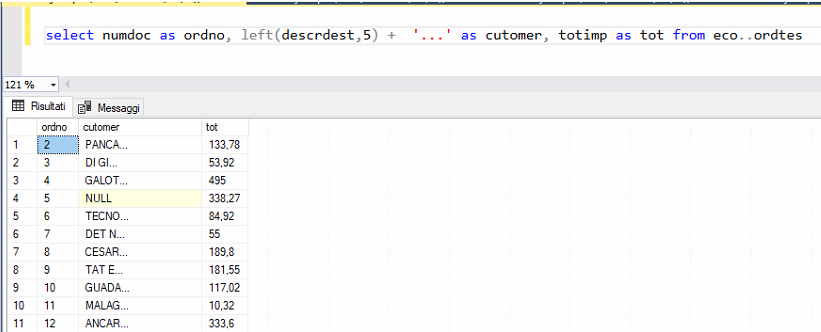
Hello friends, Its the time for another " useful but fast & easy ” tips! The question of today is:   I have a query, a select on my database the "give me" a resultset which I need to export to a text file. How to produce the text file? maybe this operation must be schedulable. So, How to do it?  We can take advantage of the SqlCmd command that we have already used here: execute T-SQL commands from the command line   Just prepare your select as in the picture below and save it into a .SQL file.     Then open a command promp and type: SqlCmd -U xx -P yyyyy -i select.sql -o c:\dati.txt where    -U username -P password  -i the location of your script   -o is the file name that will be filled up with your data!     Et voilà!    That's all for today I wish you a great day! Luca Previous post: SQL SERVER, One thing you should definitely know about the UPDATE statement ...  

SQL SERVER, One thing you should definitely know about the UPDATE statement ...

Image
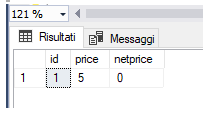
Hello friends, Today, waiting for the saturday, we talk about a simple thing that you really should know about the UPDATE statement . How many times have you seen updates done like this?    UPDATE ORDRIG SET NeatPrice = Price * (100-PercDiscount)/100, total = NeatPrice * Qty where id = XX   Notice that the result of the second field depends on the result of the first one . So in this case order matters. How does SQL Server behave in this case? Seems difficult but it is more easy than you could image!   Just learn this easy rule: The UPDATE does not see the results of its work.   Of course you can tray by yourself doing this simple update: CREATE TABLE #ORDRIG ( ID INT IDENTITY ( 1 , 1 ), PRICE FLOAT , NETPRICE FLOAT ) INSERT INTO #ORDRIG ( PRICE , NETPRICE ) VALUES ( 0 , 0 ) UPDATE #ORDRIG SET PRICE = 5 , NETPRICE = PRICE SELECT * FROM #ORDRIG   Et voilà! That's all for tod...

SQL Server, How to execute T-SQL commands from the command line (attention this post may contain easy but useful tips 😏 )

Image
Hello friends, You know, i love “ useful but fast & easy ” tips! The question of today: Have you ever needed to run T-SQL commands from the command line? Yes? So, How to do it? Well, an easy way is to use the sqlcmd command. But what is the SqlCmd? The SqlCmd is a command line utility that is part of the standard installation of SQL Server and that you can run from the command prompt. First you need to prepare a script that contains the T-SQL commands to execute. In my example i saved myscript.sql in C:\TEMP folder. Second , just open the command prompt   And type in: sqlcmd -U "XX" -P "YYYY" -S "ZZZZ" -i “c:\temp\MyScript.sql”   You need to specifiy only the login information using: -U username -P password -S the server name -i the location of your script           Et voilà!  That's all for today! Luca Previous post: SQL Server, How to Read a list of files in a folder and compare its name with the value stored into a column...