Posts

Showing posts with the label UPDATE

SQL Server, Non-updating updates ...why avoid them clearly explained!

Image
Hi Guys, Today we will talk about Non-updating updates . I recommend that you read because these are important aspects when it comes to performance. I will not go into the details of what happens (maybe in the future) rather I have developed a very clear example. What Non-updating updates are?   Well, Enjoy the reading!     Non-updating updates  A non updating update is an update the not change any value.    Suppose we perform an update on field A which contains the value 1 to put the value 1 ... this is it a non updating update. UPDATE TABLE SET MYFIELD = 1 (when the value of the field myfield is already equal to 1) UPDATE TABLE SET MYFIELD = MYFIELD WHERE ...   But who is it that does such a thing?   ...unfortunately many! Many always perform a single update on all fields in a table, even if these have not changed. To make you understand the weight of this operation, I have developed a simple example that demonstrates the differenc...
SQL SERVER, One thing you should definitely know about the UPDATE statement ...

Image
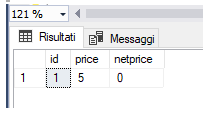
Hello friends, Today, waiting for the saturday, we talk about a simple thing that you really should know about the UPDATE statement . How many times have you seen updates done like this?    UPDATE ORDRIG SET NeatPrice = Price * (100-PercDiscount)/100, total = NeatPrice * Qty where id = XX   Notice that the result of the second field depends on the result of the first one . So in this case order matters. How does SQL Server behave in this case? Seems difficult but it is more easy than you could image!   Just learn this easy rule: The UPDATE does not see the results of its work.   Of course you can tray by yourself doing this simple update: CREATE TABLE #ORDRIG ( ID INT IDENTITY ( 1 , 1 ), PRICE FLOAT , NETPRICE FLOAT ) INSERT INTO #ORDRIG ( PRICE , NETPRICE ) VALUES ( 0 , 0 ) UPDATE #ORDRIG SET PRICE = 5 , NETPRICE = PRICE SELECT * FROM #ORDRIG   Et voilà! That's all for tod...

SQL Server, how to detect if the values of a column have changed

Image
Hi Guys, Welcome back! Today we have a little insight into the world of triggers . We will see in which ways to detect if the values ​​of a column have changed Ready? Go! The UPDATE function In a trigger, the UPDATE (FIELD) function is the fastest way to check whether the value of the <FIELD> field has changed. It is faster because it only parses the T-SQL command to be executed even if the field value is not actually changed. Example: UPDATE TABELLA SET FIELD = FIELD always return TRUE Reading the tables INSERTED and DELETED Alternatively, to check if the value of a field has been changed, you can query the two tables INSERTED and DELETED by putting them in JOIN: IF EXISTS( SELECT I.ID FROM INSERTED I JOIN DELETED D ON I.ID = D.ID WHERE I.FIELD <> D.FIELD) BEGIN END That's all for Today! Luca You may also be interested in: SQL Server: Transazioni, Lock e Deadlock. Un po di teor...